
Report – Unfulfillable Orders
Go to Orders - Manage Orders.
Set filters:
- Fulfillment Status = Unfulfilled
- Ready To Ship = No
- Click "Warehouses" column to sort such that Warehouse = FBAFlexPrep appears at the top. (Shiphero has an issue with the Warehouse filter so it does not work and this is the workaround solution.)
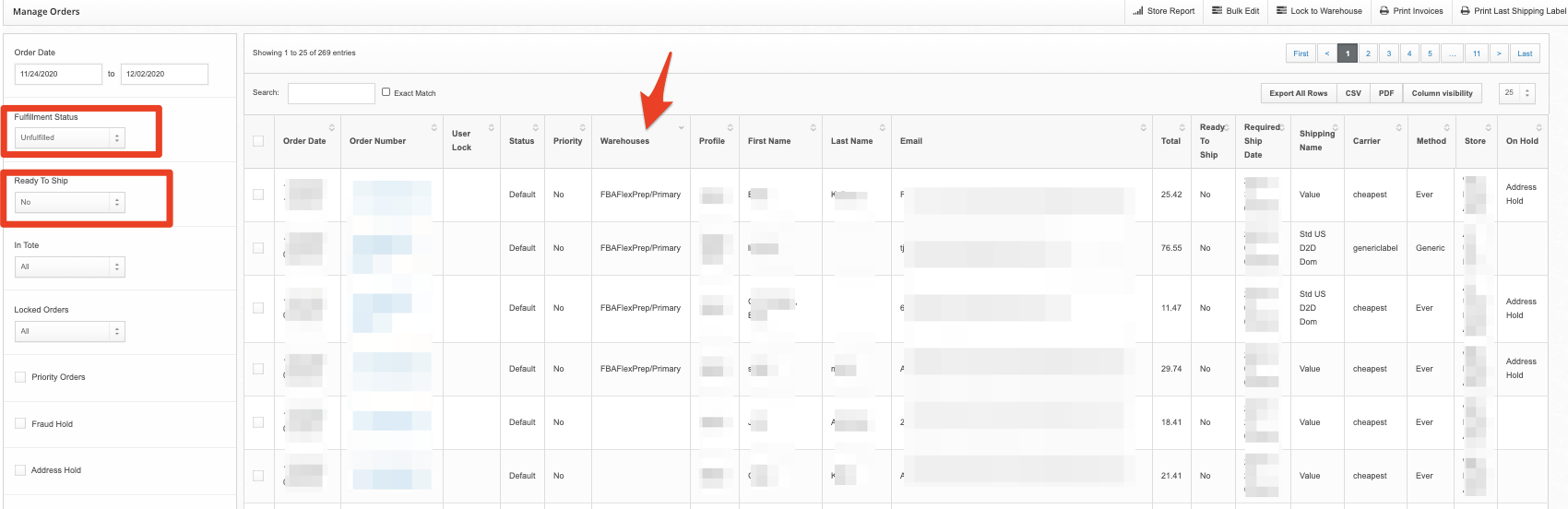 From here you will see any issues that WILL NOT APPEAR TO OUR FULFILLMENT QUEUE. You can investigate these specific orders further to prevent late shipments.
 From here you will see any issues that WILL NOT APPEAR TO OUR FULFILLMENT QUEUE. You can investigate these specific orders further to prevent late shipments.
Common reasons:
- Check the right-most column that says "ON HOLD". There is typically an Address Hold where the address needs to be fixed.
- Missing SKU in Shiphero
- Missing Inventory (Out of Stock)