
How to Create a Kit with Components
A Kit is a SKU created by defining Components that make up the kit.
- The Components are your other SKUs in ShipHero, whether through manually creating the SKUs or by storefront integration.
- A Kit SKU does not have actual inventory quantities recorded in the FBAFlexPrep warehouse. Instead, it consists of individual Components (SKUs) that are stored with FBAFlexPrep.
How to Create a Kit
VIDEO GUIDE
TEXT GUIDE
1. You must have a SKU for the Kit. This is either created manually or as an imported SKU through your storefront integration.
2. Go to your SKU's product page.
3. Find the "Components" section and search for your component SKU to add:
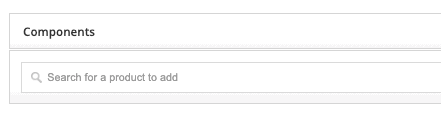
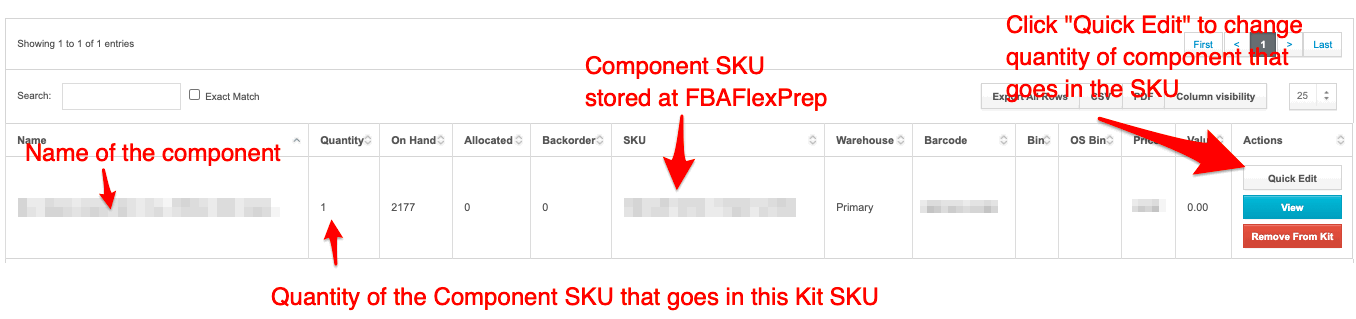
4. Once you've added your Component SKU, you should see the following below.
Click "Quick Edit" by the appropriate Component SKU to edit the "Kit Quantity", which is the quantity of the component SKU that will be needed for the kit.
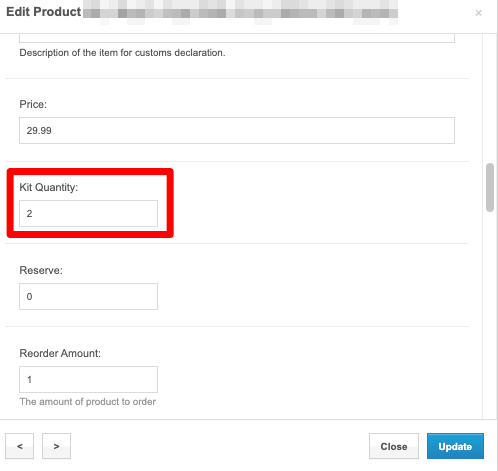
After clicking "Quick Edit", you'll see a pop-up screen. Scroll down to find "Kit Quantity". Enter the quantity of Components needed for the kit. In the screenshot below, 2 units of the Component SKU will be needed for the example Kit. Click "Update" when complete.
You should now see the Quantity for the Component SKU updated to reflect the Kit Quantity you entered:
 Repeat this process for each Component SKU needed. Once all Component SKUs are added and the Kit Quantity is set up, you are done with setting up the Kit SKU!
Your Kit SKUs will automatically draw from the component SKUs when orders for the Kits are received and fulfilled. The quantities for components will be deducted. The quantity available for the Kit SKU will be set to the number of components on-hand required to create the kits. For example, if you are selling a 2-pack (the Kit SKU) and have 100 single units (the Component SKU) -- you will have 50 sets of 2-packs available for sale. If a single unit gets sold and there are only 99 single units available, your Kit SKU will automatically update to have 49 sets of 2-packs available (based on the 99 Component SKU units).